
- False Microsoft alerts push users into panic-driven, costly mistakes
- Visual authenticity no longer guarantees safety in a manipulated digital landscape
- Cyber attacks are increasingly targeting human psychology rather than technical weaknesses
The authority and familiarity of a big brand like Microsoft often gives users a sense of security – but new research has warned that this is not always the case.
Findings from the Cofense Phishing Defense Center claim that this trust can be exploited, as seen in a recent campaign where criminals manipulated Microsoft’s branding to deceive victims.
What appears to be a legitimate support process often becomes a gateway to financial and data compromise that bypasses conventional cybersecurity defenses.
How financial lures start the deception
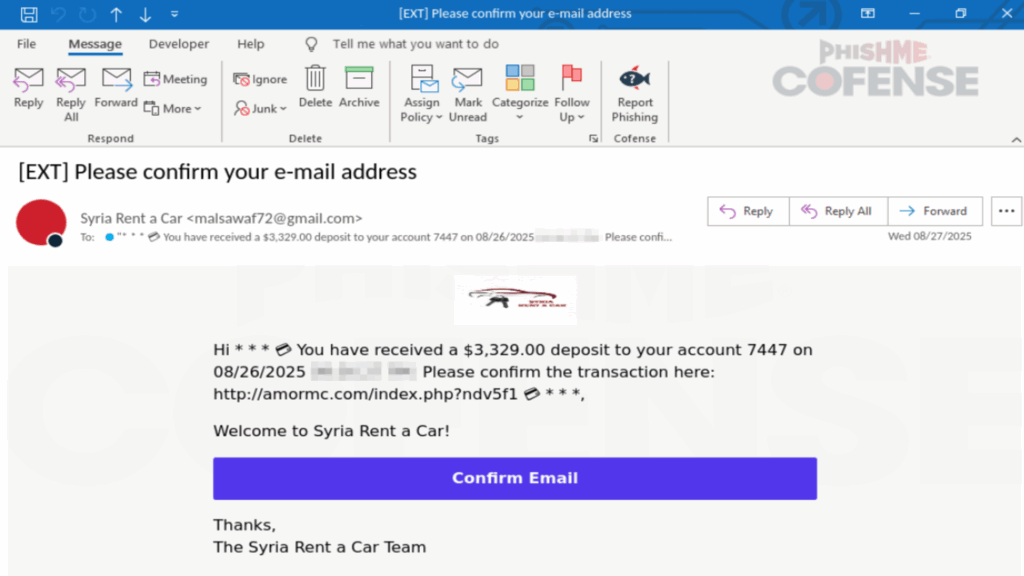
Cofense outlines how the scam begins with an email that appears to come from a legitimate business, such as a car rental company, claiming that a refund is awaiting confirmation.
This “payment lure” is designed to appeal to human curiosity and expectation of financial benefit.
When the recipient clicks to confirm the email, they are redirected to a spoofed CAPTCHA page.
The purpose of this phase is not only to make the process seem authentic, but also to involve the user in a way that avoids automated scanning tools.
By establishing early trust and commitment, criminals prepare the ground for a more manipulative encounter.
The real manipulation unfolds on the next page, which hijacks the user’s browser with a fabricated Microsoft interface.
The browser appears to be locked and a series of pop-ups declare that the system has been compromised.
At the same time, the victim’s mouse does not respond, which reinforces the illusion of a system lockup.
This tactic mirrors the visual and behavioral patterns of ransomware, generating fear and confusion.
The feeling of helplessness is intentional, pushing users to look for immediate solutions – and in this artificially induced crisis, there is a prominent display of a toll-free number for “Microsoft Support.”
This appears to provide relief, but actually leads directly to the perpetrators.
When the victim calls the number, they are connected to a scammer pretending to be a Microsoft technician who can request credentials or persuade the victim to install remote access software.
Once in control, the criminal can steal data, transfer money or install hidden malware.
Mitigating such scams requires both technical and behavioral defenses.
Organizations should combine the use of secure email practices with filtering, secure browsing controls and prompt reporting processes to limit exposure.
Regular phishing simulations and awareness training help users identify deception early and respond safely.
If a system appears to be locked or displays alarming pop-ups, users should avoid interacting with phone numbers on the screen and instead contact the vendor through verified channels.
Users must treat even familiar branding as a potential risk indicator rather than a sign of legitimacy.
Visual authenticity should never be accepted as proof of safety, especially when paired with urgent or fear-based messages.
Follow TechRadar on Google News and add us as a preferred source to get our expert news, reviews and opinions in your feeds. Be sure to click the Follow button!
And of course you can too follow TechRadar on TikTok for news, reviews, video unboxings, and get regular updates from us on WhatsApp also.


