
- NordVPN researchers uncovered a massive recruitment phishing scam
- Scammers impersonate top global employers such as Meta, Disney, Spotify
- Hackers use fake job portals to steal job seekers’ Facebook login details
The job market is tough enough without having to dodge cybercriminals. But according to new research from NordVPN, hackers are now impersonating recruiters from some of the world’s biggest brands to hijack unsuspecting job seekers’ social media accounts.
The cyber security firm’s Threat Intelligence unit has uncovered a highly sophisticated phishing campaign that weaponises the names of major employers including Meta, Disney, Coca-Cola and Spotify. Instead of stealing your money outright, the operation is designed to quietly harvest your Facebook credentials.
By deploying polished recruiting emails, hidden “HUB” domains and incredibly realistic job portals, attackers trick applicants into handing over the keys to their digital lives. With social media accounts often linked to other sensitive apps and services, a compromised Facebook login can quickly turn into a devastating breach of privacy.
If you want to protect your personal data while applying for roles online, using one of the best VPN services with built-in anti-malware and malicious tracker blocking is a smart first step. But staying completely safe from targeted phishing requires a deeper understanding of how these multi-step scams actually work.
From fake job offers to full account hijacking
The campaign starts with a professional-looking cold email, often sent through legitimate platforms like Google AppSheet to slip past standard spam filters.
These messages contain plain grammar and target victims whose contact information has likely been scraped from platforms like LinkedIn or exposed in previous data breaches.
Clicking on the email link takes victims to a “HUB” domain (e.g career.meta-find your job[.]com).
Interestingly, NordVPN found that these sites have a clever built-in evasion tactic. If a security scanner or analyst visits the URL directly, all they see is an empty, harmless web page. The malicious “Search for a Job” button is only activated when the site is triggered by a unique referral link embedded in the original phishing email.
When the victim clicks through, they land on an intermediary site that flawlessly mimics a legitimate company’s job board. Researchers identified several fake portals, i.a connect.spotifycareerapply[.]com for Spotify and jobquest.wdcfuturesteps[.]com for Disney.
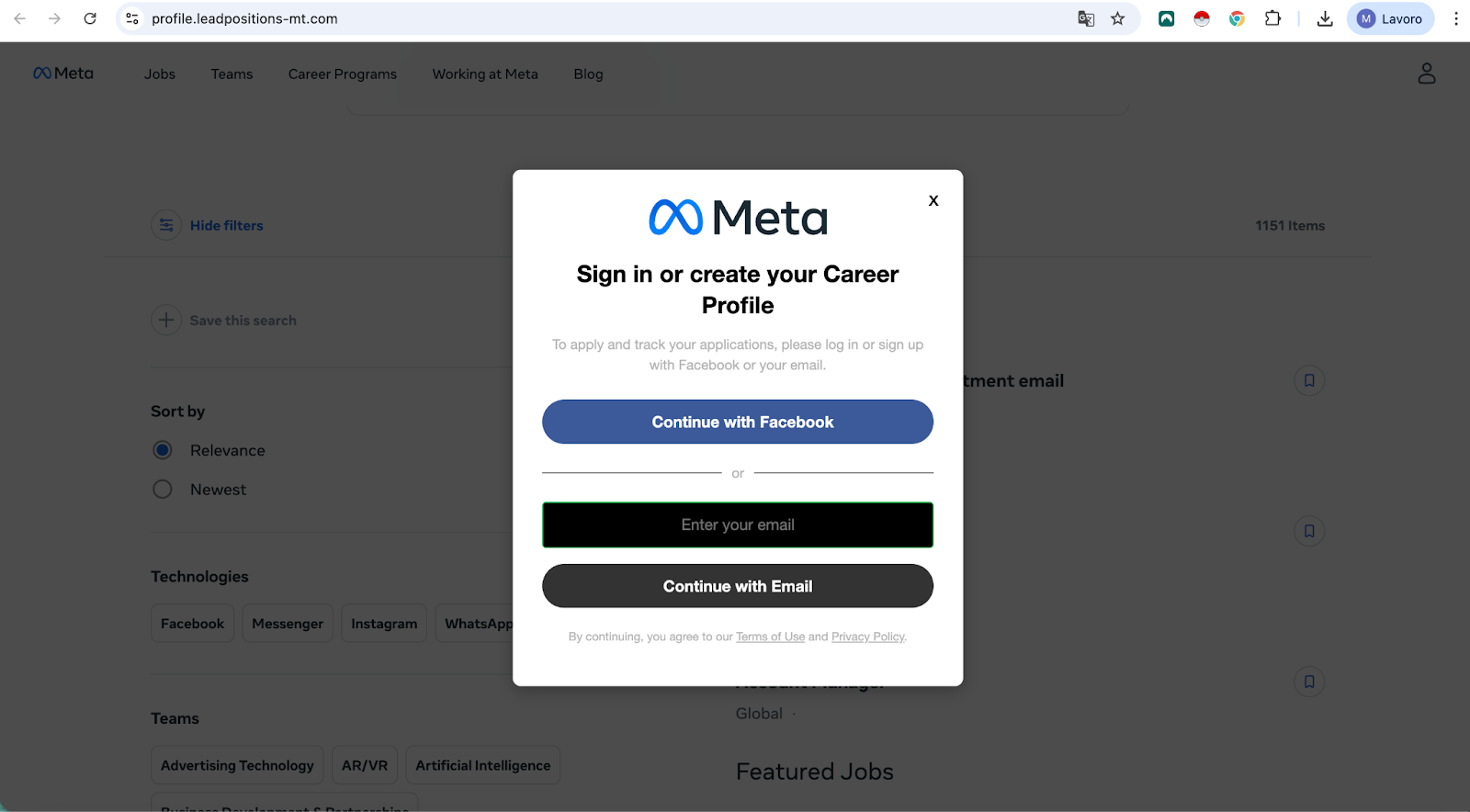
The trap finally closes when the applicant clicks “Apply”. Instead of a standard application form, they are greeted with a prompt that requires them to log in via Facebook to continue. This fake login page captures the victim’s username and password, giving the attacker total control over the account.
Domininkas Virbickas, director of product at NordVPN, explains that job seekers are “unequivocally vulnerable” to this type of attack. That’s because they’re already in a mindset where sharing personal data and following instructions from unknown contacts is the normal process for landing an interview.
“Such campaigns take advantage of that trust by using polished communications and convincing fake career portals that are almost indistinguishable from the real thing,” Virbickas said.
How to stay safe during your job hunt
This campaign proves that cybercriminals are constantly finding new ways to weaponize professional contexts to bypass our natural skepticism. Because this attack flow so closely mimics a real company’s hiring process, even cautious internet users can be caught off guard.
To protect yourself, NordVPN recommends making it a habit to verify the URL before entering personal data. Legitimate megabrands will always host their careers pages on official, recognizable domains, not unusual third-party links.
The same rule applies to social login prompts. A genuine “Login with Facebook” button will always redirect you safely to the official facebook.com domain. If the URL bar shows something else, close the tab immediately.
If you’re still in doubt, I recommend running the link through NordVPN’s URL Checker or similar software. It is completely free to use for anyone, even those who do not have an active NordVPN subscription.
Finally, NordVPN suggests always enabling two-factor authentication (2FA) across your social media profiles. Even if a sophisticated phishing site manages to steal your password, 2FA acts as an important safety net that blocks attackers from accessing your account.
Follow TechRadar on Google News and add us as a preferred source to get our expert news, reviews and opinions in your feeds. Be sure to click the Follow button!


