
- Microsoft is improving Windows 11 search in several ways
- It includes a quieter search panel, the ability to turn off web results, a better way to prioritize returned results, and a more stable search overall
- This is in testing for now and the main concern is how long it might take for Microsoft to push all of this through to release
If you’re tired of the way Windows 11’s search functionality works—and you wouldn’t be alone—some incoming changes are set to significantly improve that experience.
Microsoft revealed the search field tweaks in a blog post, explaining that they are being delivered via a gradual rollout to testers in the experimental channel for Windows 11 preview builds.
The first big change is simply to make the search a quieter place, so that when the panel appears, it only contains a list of your most recent searches (so you can easily start one of them up again if you want). The current clutter to the right of the list, including recommendations – some of which are direct advertisements – along with popular searches have all been banished.

And the other important piece of work here is that Microsoft is finally giving Windows 11 users the option to get rid of web results in search. Currently, when you search for a file in the operating system, you get not only local results (for files on your drives), but also some web results that can get in the way.
In this new scheme, you will be able to turn off all web results in Settings and also drop suggestions from the Microsoft Store.
If you keep these results on, Microsoft notes that they won’t be prioritized, although this is something the company had already started to address (it used to be that web content could appear at the top of the returned results in a really confusing way). Web results have also been stripped of any “promotional content” so you only get the most relevant answers if those results are enabled.
Microsoft has also strengthened the handling of results for Windows 11 settings so that more relevant options are marked higher in the pecking order, and Microsoft says further fine-tuning is planned on this front.
The search box will also be able to handle misspellings with an improved ability to guess what you really meant (‘Chrome’ rather than ‘Chome’ for example) and it will start showing possible results after entering just two characters (another improvement we’ve already heard about).
While this is mostly about streamlining, Microsoft is going the other way in one notable respect – adding a little more detail for the files returned in the results. Search will now provide more information about files (such as when they were last opened) and a more in-depth preview in the right panel, so you can more easily see what you want to open if you click on that result.
Finally, Microsoft is making search more reliable, which involves “reducing [the] likelihood of crashes and loading issues”, which is of course a welcome feature.
Analysis: the deployment fly in the soothing search salve
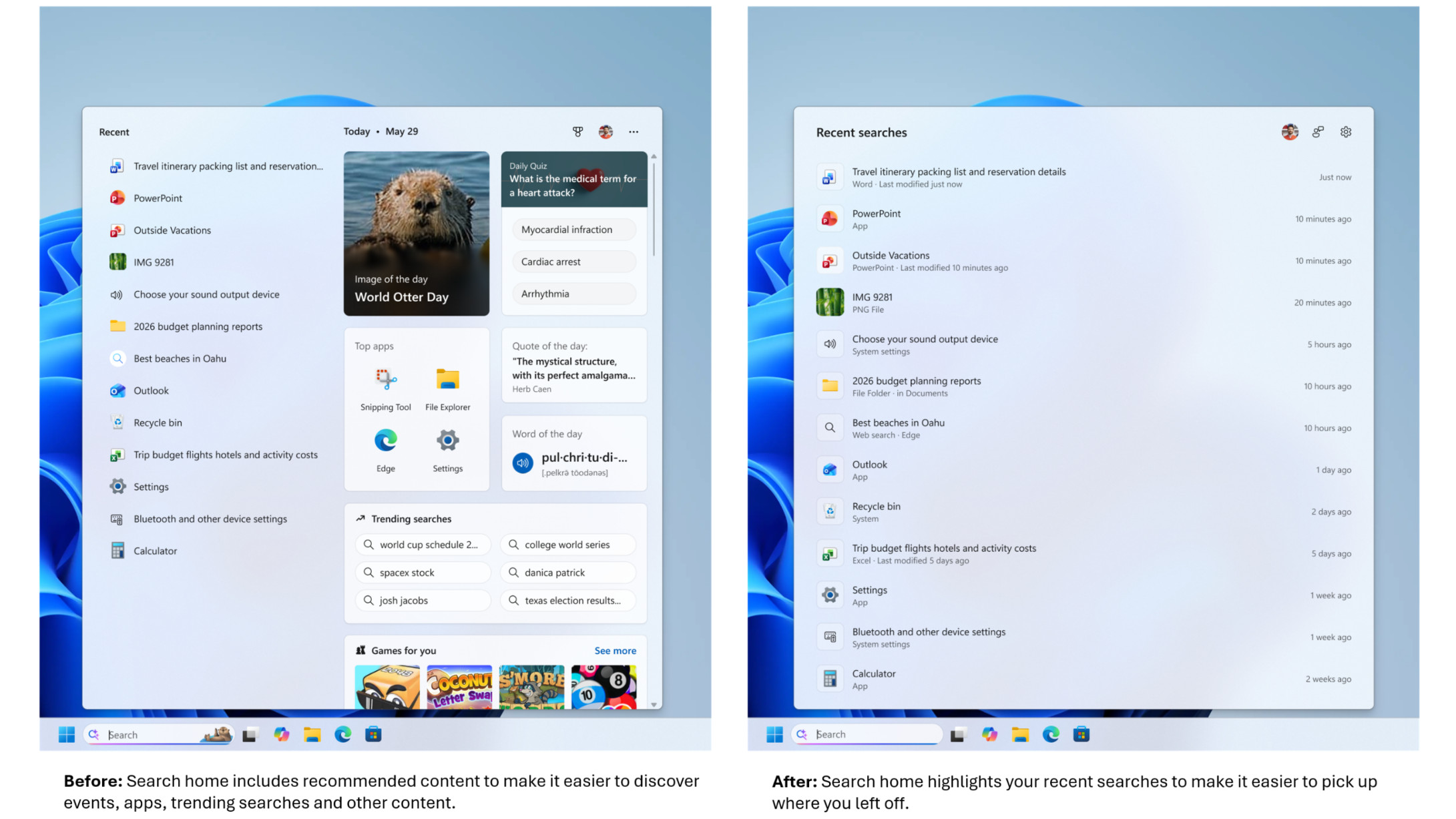
Windows 11 search has always been a bit of a pain for me, mainly thanks to the clutter of the thinly veiled (or not veiled at all) ads and the irrelevant results that popped up with a confusing priority level, as mentioned. Windows 10 honestly isn’t much better, but anyway I’m very happy to see the new direction Microsoft has taken here.
The quieter search results are a big boon, with Microsoft following in the same direction as the streamlining it recently announced for the widget panel, which was made into a quieter place. (All of this follows a broader early promise to rein in the upsell with Windows 11 and generally make the interface a cooler place).
I was hoping that the option to disable web results would be brought in and this is the most important addition for me personally. I’m not alone and the reaction to these various changes has been very positive, with the only real issue being impatience as to when these new features will be rolled out. That’s both in the form of testers wanting to try out the revamped search box now, and the general computing public wondering when they’ll eventually get their hands on all of this.
As this tester writes on Reddit: “We love this… except for gradual rollouts. We don’t like when things are inconsistent from PC to PC despite running identical [test] builds [of Windows 11]. It’s really uncomfortable and breaks the muscle memory. But the changes seem big and I’m looking forward to trying them out.”
As Microsoft points out in its blog post, it’s worth bearing in mind that there are now feature flags that can be enabled if you’re really keen to try something in a preview build and it’s not on your PC yet.
But as for those who ask, ‘For those of us who are released, when can this come?’
Well, that’s a very different kettle of fish, as it can take quite a while for this work to develop through testing. Mainly because there’s a lot of change involved, and it’s not something Microsoft wants to rush (especially given the drive to make search more reliable and stable).
And when these search improvements are eventually released outside of testing, it will be on a controlled rollout that you won’t be able to jump the queue with. There’s a reason for that, though – Microsoft will need to observe the changes going live in a gradual fashion to ensure no unexpected gremlins crawl into the works.
So you’ll have to be patient, and there’s some frustration with how long it can take for controlled rollouts to proceed these days (the Start Menu overhaul from last year is a key example here – some people still don’t have it even now). But the good news is that these changes are coming, and they promise to significantly revamp search in Windows 11. I can’t wait (but I will have to).

Follow TechRadar on Google News and add us as a preferred source to get our expert news, reviews and opinions in your feeds.

The best laptops for all budgets