
- EV route planning on Android Auto gets a smart upgrade
- It’s rolling out across 350 EV makes and models in the US
- Changes to the way media autoplay works are also shown
If you’re using Android Auto inside an electric vehicle, route planning just got significantly smarter and more personalized – while there are also signs that the Android dashboard will improve the way auto-play audio is handled.
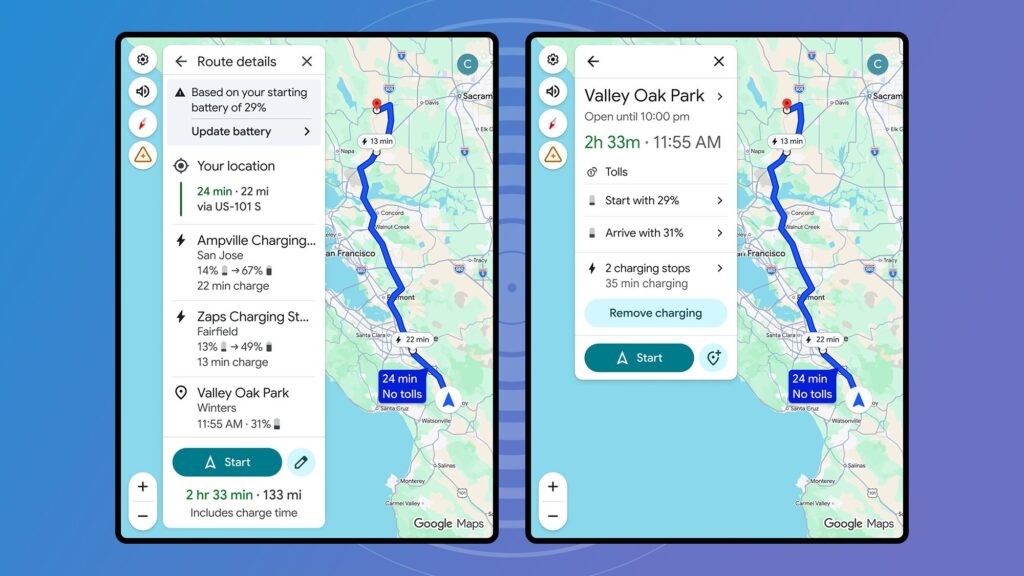
First up is EV route planning, which is powered by AI and makes charging recommendations based on your car’s make and model and how much battery you have left. Google says the upgrade applies to more than 350 electric vehicles with Android Auto available across 16 brands.
While basic search for EV charging points was already available in Google Maps and Android Auto, the software will now be able to leverage what it knows about the EV you’re in to suggest where to recharge and when, given the length and destination of the trip you’re about to take.
The article continues below
Android Auto will use its AI algorithms and calculations about your vehicle’s weight and battery size to give you the best route and charging options. These details will be combined with the usual Google Maps data, including real-time information about traffic, road elevation and weather conditions.
Autoplay prompts
To take advantage of the new EV route planning features, you must first tell Google Maps about your car. From the app on your phone, tap your profile picture (top right), then tap Settings > Your vehicles to enter the details below Motor and Vehicle.
When you plot a route on the Android Auto dashboard, you’ll be able to set your starting battery level. Google says the feature is now being rolled out to models from Audi, BMW, Chevrolet, FIAT, Genesis, Hyundai, Jaguar, Kia, Lexus, Lucid, Mercedes-Benz, Nissan, Porsche, Subaru, Toyota and Volkswagen – although this is only in the US for now.
Our second Android Auto tidbit is something spotted by Android Police. It seems that if you quickly stop media from autoplaying on the dashboard three times in a row, you’ll be asked if you want to turn off autoplay via a pop-up warning – so the next time Android Auto connects, nothing will start playing right away.
This behavior can already be controlled via Android Auto on your phone (on Pixel devices it is under Settings > Connected devices > Connection preferences > Android Auto), but it’s a toggle switch that many users may have missed. The new prompt makes it a little easier to disable autoplay if you’d like.
Follow TechRadar on Google News and add us as a preferred source to get our expert news, reviews and opinions in your feeds. Be sure to click the Follow button!
And of course you can too follow TechRadar on TikTok for news, reviews, video unboxings, and get regular updates from us on WhatsApp also.


