

- Windscribe adds IP pinning and IP rotation for easier IP control
- Users can lock to a preferred IP or switch to a new one
- They will reduce login issues, CAPTCHAs and streaming errors
About two weeks after Winscribe launched its next-generation server stack, FreshScribe, the company is delivering on the promises of further VPN innovation.
Right at the top, Windscribe has launched IP Pinning and IP Rotation. These two innovative features, the provider explains in a blog post, are set to give you more freedom and control over how you use your VPN IP address, so you can lock your connection to a specific IP or get a shiny new one without having to disconnect the VPN.
Together, they aim to drastically reduce the disruptions—think website and streaming bans, CAPTCHAs, IP blocks, and frustrating security questions—you encounter when browsing online.
Beyond convenience, Windscribe has ensured that both features uphold the company’s commitment to privacy. That’s why they’re designed to always work over a zero-knowledge API, which in simple terms means that Windscribe doesn’t even record the IP addresses you use, so your browsing stays private.
What is IP Pinning
Although all the best VPNs, including Windscribe, have thousands of IP addresses in their list, not all of them are created equal. Depending on server load, ISP routing, and whether an IP is already marked by certain services, some work better than others.
With IP Pinning you can now “pin” an IP that you have found works perfectly from your location. This will be handy for sites that expect consistency and don’t appreciate you logging in from a new location each time, such as banking apps and telecommuting portals.
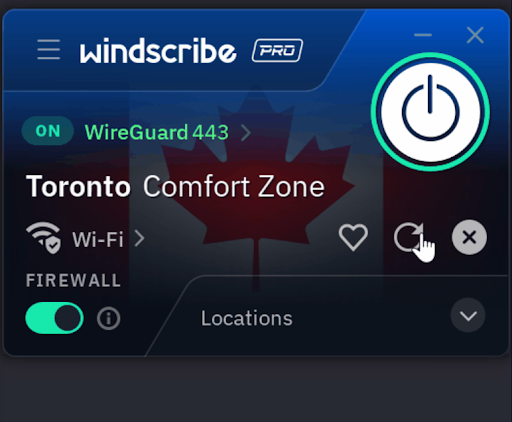
To pin your IP, click on the three dots next to your connected IP and tap on the heart icon. It is important to remember that you are actually “pinning” the IP, not “reserving” it, as these addresses remain part of a shared pool and are not exclusively assigned to you.
You can think of IP Pinning as a lighter version of owning a dedicated IP, which gives you a permanently reserved IP address for you.
This feature is also best-effort, meaning Windscribe will keep it pinned for you as long as the IP is available – although you can always pin someone else.
What is IP rotation
IP rotation is essentially the opposite of IP pinning. It lets you switch to a new IP address without disconnecting from the VPN.
This is useful if your current IP is causing problems – for example, if a site keeps throwing CAPTCHA challenges, or if that IP has been banned.
It also helps in situations where you don’t want to (or can’t) change your VPN location, like when you’re trying to unlock a foreign Netflix catalog and changing the location would block you from viewing it.
Also, rotating your IP in Windscribe is just a two-step process: just click the three dots next to your connected IP and tap the circular arrow.
While Windscribe’s IP Pinning is a truly unique feature we haven’t seen offered by other top private VPNs, rivals like ExpressVPN and Surfshark also offer some form of IP rotation.
Both ExpressVPN’s ShuffleIP and Surfshark’s Multi IP give you a new random IP address for every website, app, service or web server you access within the same session, without changing your VPN location. These features are designed to break cross-destination interconnection and significantly enhance privacy.
Windscribe’s IP rotation, on the other hand, makes things simpler. Instead of automatically assigning a different IP for each site, it lets you manually rotate your IP for the entire session across all sites you visit.
So while ExpressVPN and Surfshark focus on maximum anonymity with continuous IP changes per site, Windscribe’s method is more rooted in convenience – a quick two-click way to get a fresh IP without reconnecting or switching servers.
Follow TechRadar on Google News and add us as a preferred source to get our expert news, reviews and opinions in your feeds. Be sure to click the Follow button!


