- Microsoft has blocked Secure Boot updates on some devices
- There have been issues with some devices updating from the 2011 certificate to the latest 2023 certificate
- Some older devices or those not supported by their OEM may be limited to download the latest Secure Boot certificates
Microsoft has blocked some Windows 11 PCs from installing Secure Boot updates due to known issues with certificate updates.
The company is currently rolling out an update to Secure Boot on devices using certificates issued in 2011, which have now expired. The new 2023 certificate is applied via Windows Update, but problems on devices with defective firmware have forced Microsoft to stop the rollout.
“Devices in this group are affected by a known issue. To reduce risk, Secure Boot certificate updates are temporarily paused while Microsoft and partners work toward a supported solution,” Microsoft said.

Problems with secure boot
Secure Boot has long been a device-saving feature when it comes to removing malicious files, as it allows the device to verify and only load authentic software before booting into Windows. However, if the device cannot receive certificate updates, it may fall victim to boot-level threats before Windows loads.
Microsoft is currently working with manufacturers to issue a patch that will allow affected devices to install the new Secure Boot 2023 certificate, with HP issuing a BIOS update to allow the installation of the latest certificate.
What this means in practice is that some older devices or devices that no longer receive updates through their Original Equipment Manufacturer (OEM) will not be able to use Secure Boot and Boot Manager protection. Microsoft clarified that “this results in a gradual reduction in long-term security – not an immediate risk or system failure. Continue to follow standard security practices, including staying current with Windows updates.”
So even if your device is blocked from installing the latest Secure Boot certificate, it will continue to work properly, other Windows updates will continue to work, and your Secure Boot version will continue to protect against known vulnerabilities. These are just future vulnerabilities that users affected by this issue should be aware of.
Many users may not be aware of problems until they need to use Secure Boot, so the best thing about Microsoft’s warning is that now is the perfect time to check if your Secure Boot is working properly.
How to check that Secure Boot is up to date
To check if you are using the latest Secure Boot certificate, take the following steps:
- Open the Windows Security app using the search bar
- Navigate to the device security dashboard using the menu on the right side
- Look at the Secure Boot section and check for the following messages:
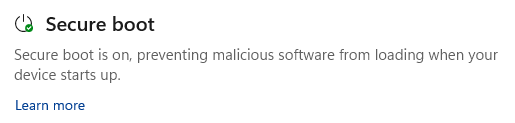
- “Secure boot is enabled”
If you see this message, Secure Boot is probably working properly. However, this does not show the current state of your certificates. Microsoft has rolled out an update to show if your Secure Boot is running on the latest certificate, so make sure you don’t have any pending Windows updates.
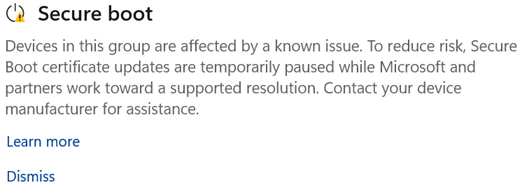
- “Devices in this group are affected by a known issue.”
Devices with this message will likely be able to install the latest certificates once a firmware update has been issued by your OEM. Check your OEM update channel for availability.
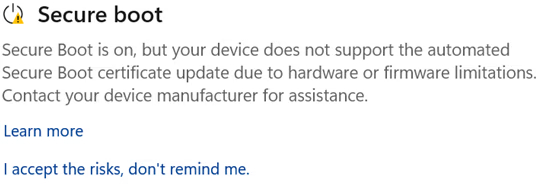
- “Secure Boot is turned on, but your device does not support the automatic update of the Secure Boot certificate due to hardware or firmware limitations.”
Devices with this message may no longer be supported by your OEM, or the OEM may no longer be able to provide the necessary firmware updates. Microsoft recommends that you check your OEM’s Secure Boot support page to confirm if your device is out of support.
Via Latest Windows

Follow TechRadar on Google News and add us as a preferred source to get our expert news, reviews and opinions in your feeds.