
- ChatGPT can now compose and send emails without leaving the chat window
- The feature currently only works with connected Gmail and Outlook accounts
- You can’t send attachments, which limits its usefulness
I asked ChatGPT to write and email me. It drafted the message, connected to my inbox, and made it ready to send without me ever opening Gmail. For a moment it felt like the AI assistant we’ve been promised for years. Then I tried to attach a file – and I was brought back down to earth.
ChatGPT’s new ability to send emails directly from a chat, which quietly dropped yesterday, is available to most paid ChatGPT users in the web version of ChatGPT right now. It only works if you’ve connected your Gmail or Outlook account to ChatGPT, so it doesn’t work across all email clients, and there are other limitations as well.
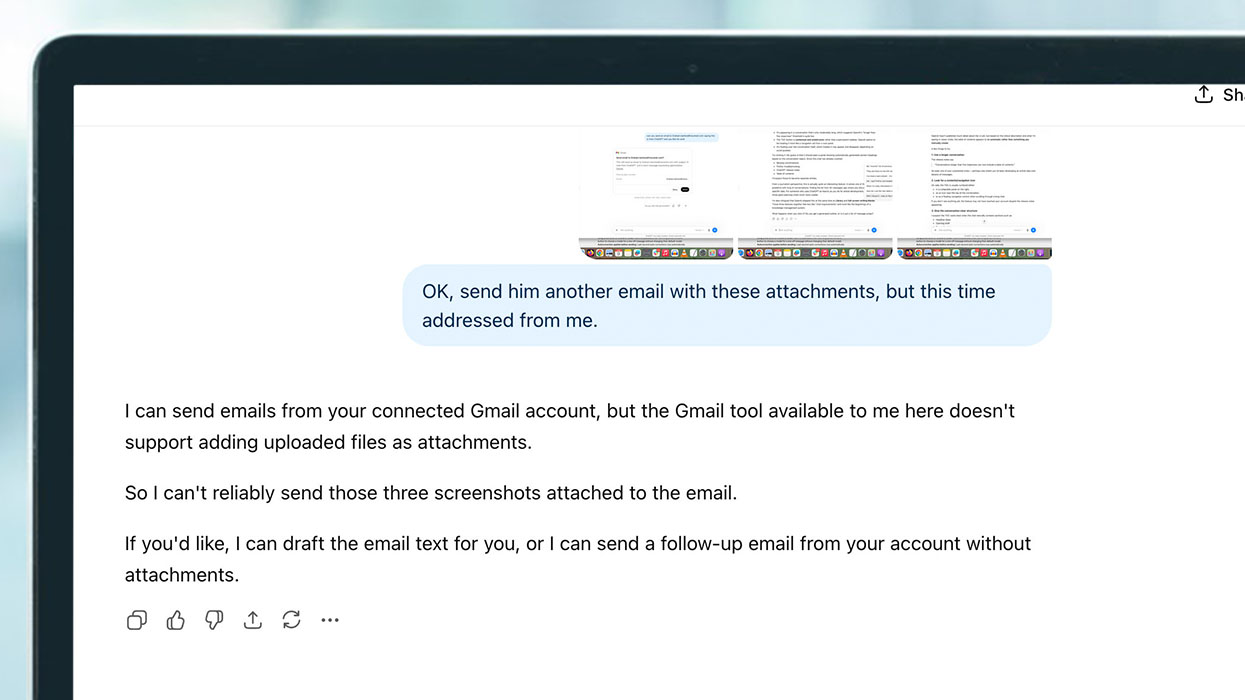
For example, as I discovered, you can’t send attachments yet, which is a pretty big problem if OpenAI wants people to take ChatGPT more seriously as an AI assistant.

The final limitation is that you cannot do this on Free or Go accounts or through the ChatGPT apps on desktop and mobile. Sending emails is only available on the web version of ChatGPT for users on Plus, Pro, Business and Enterprise plans.
The first taste of an AI assistant
I have to admit, it was quite a thrill the first time I tried to send an email from the chat. I used it to send an idea for a story to my work email address and I asked ChatGPT to provide some background information on the topic. I didn’t write the whole email – I just trusted ChatGPT to come up with the content and included the link to the source I provided.
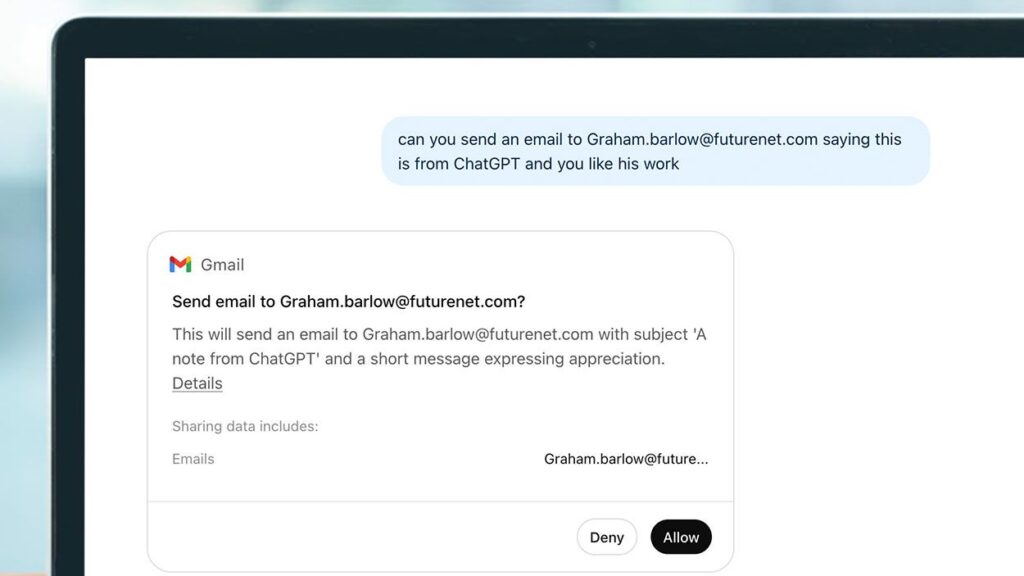
ChatGPT told me exactly what it was going to do and displayed a dialog box explaining the action it was about to take and asking if I wanted to allow or deny it. I clicked Details to review the exact email it planned to send and, satisfied with what I saw, clicked Allow. Seconds later, the email arrived in my work inbox.
Of course, sending an attachment failed, but the fact that you can do all of this from within the chat is what’s impressive. If you’re already working in ChatGPT, this means you can send an email without interrupting your flow.
A missing feature changes everything
If you haven’t connected your Gmail or Outlook account, open Settingschoose Appsso Add moreand search for either Gmail or Outlook to connect it.
What makes the feature remarkable is that not all AI assistants can do this yet. When I asked Gemini to email me, Google’s chatbot replied that it couldn’t send messages directly or access my accounts to do so. Gemini can help draft emails, but ChatGPT’s ability to actually connect to your inbox and complete the task is a glimpse of where AI assistants are headed.
The new ability to send email may be limited right now, but like most things OpenAI releases, it will likely improve over time. Still, the lack of attachment support feels like a significant omission. Sending files is one of the most common reasons people use email, and until ChatGPT can handle that, and also deal with reading emails, it’s hard to see it replacing a traditional email client.
Still, it’s a promising first step. I also hope to see support for more email providers in the future. However, starting with Gmail and Outlook covers a large percentage of users, so there’s a good chance you can try the feature for yourself today.

Follow TechRadar on Google News and add us as a preferred source to get our expert news, reviews and opinions in your feeds.


